Hi. When going page down/page up i have drawing screen delays. I tried with a simple pdf imported. Here is the video
https://icedrive.net/s/7wgvwwb9SFBuARQWXzQFQ99AYu2a
Additional Bezier Editing Workflow Suggestions
In addition to the curvature visualization and harmonization ideas mentioned above, I would also like to suggest a few advanced Bézier editing improvements specifically for precision logo and lettering work:
- Multi Handle Editing
Ability to select multiple anchors and adjust their handles simultaneously while preserving relative angle and length relationships.
This would allow proportional refinement across connected segments without manually adjusting each handle one by one.
- Real Time Symmetry Edit Mode
A non-destructive symmetry editing mode for path refinement.
Desired behavior:
• Select mirrored anchors or handles
• Move them simultaneously relative to a chosen axis
• Support vertical, horizontal, or custom symmetry axis
• Temporary activation via modifier key
• Preserve existing node structure
This would significantly accelerate refinement of symmetric shapes like O, U, arches, bowls, and logotype constructions.
- Independent Anchor Repositioning (Handle Preserving Move)
An option to move anchor points without altering handle angles or segment tangency.
This would allow micro-adjustments in curve positioning without rebalancing both handles manually after every move.
- Intelligent Line to Curve Conversion
When converting a straight segment into a curve:
• Automatically generate balanced handles
• Respect neighboring curvature
• Avoid curvature spikes
This would improve curve construction speed and reduce manual correction work.
These additions would complement the proposed curvature tools and position VectorStyler as an even stronger precision bezier environment for advanced shape construction. I believe VectorStyler’s existing architecture and curve engine are already robust enough to support these advanced workflow improvements efficiently.
I've lost count of how many times where I thought I needed a special feature
to solve a graphics problem, and Vectorstyler already had the solution built in.
In this case i got paths from an extern app as outline Shapes.
But i like to convert them in paths again.
I found this simple and nice solution:
Select your outline shapes go to:
Menu > Effects > Outline > Center Line
Here the Problem
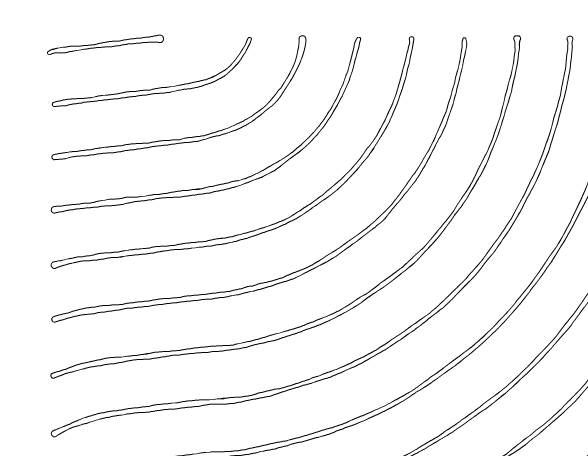
.
.
Here the Result of the Solution
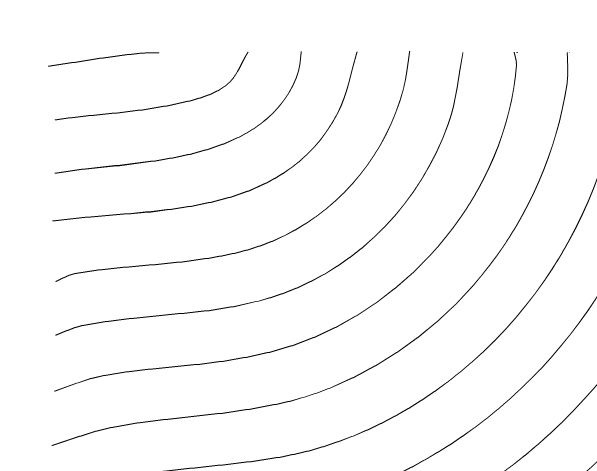
.
Deep bow to @vectorstyler !
I would like to suggest two features that would significantly enhance VectorStyler for logotype and lettering workflows:
- Curvature View (Live Curvature Visualization)
A real-time curvature overlay for Bézier curves to detect curvature spikes, G2 discontinuities, and flow inconsistencies. - Auto Smooth / Harmonization Tool
An intelligent smoothing function that redistributes curvature across selected nodes or segments, improving G2 continuity and preserving overall curve flow during local edits. For reference, tools like Glyphs (SpeedPunk curvature visualization) demonstrate how real-time curvature feedback can significantly improve precision in curve refinement workflows.
These features would make VectorStyler a much stronger precision tool for logo and typographic shape construction.

On the following page:
www.vectorstyler.com//releasepage/
Adding the release year, month, and day to each version under "Recent Updates" would be helpful for me when I want to recall or look up information. What do you think?
If there are any disadvantages for the developers, there's no need to keep it as is.
I cannot get a PNG to export fully. It initially cut off about 80% of the image, stopping near the top, while still creating a 23MB file.
I have tried other formats (JPG, PDF) which work fine. But no matter the settings I pick on PNG export it never completes.
The file also generates errors when used in other programs. I tried compressing the image with RIOT, for example, and it stated "PNG Error - Invalid code lengths set" and won't load the file.
So then I tried compressing the primary image layer prior to importing into VS.
That at least resulted in about a 60% export completion. But still cutting off the bottom third or so.
I tried compressing that one with cloudconvert compress png and it also gave an error.
I've attached a screenshot of the best PNG export I could get.
Note I tried exporting this exact same file again, and it cut it off at a different point. It's arbitrary where it ends the export.
Only 10 videos seems a bit harsh to me, since .mp4 files aren't very large.
50 videos would have been much more user friendly.
Anyway, this means that the videos in my tutorials are no longer accessible
because they're will be deleted by the hoster.
Since many tutorial videos are based on older Vectorstyler versions, they're not
that relevant anymore anyway. I'll just leave them without a working video link
for now and figure out what i like to do.
I don't know if this is relevant to Vectorstyler, but its a case of mine.
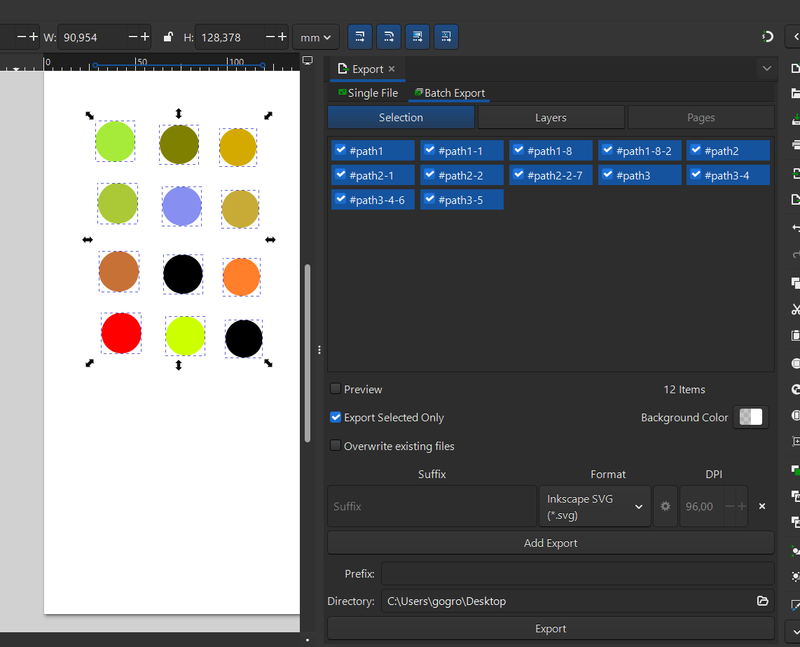
I'm missing a feature that allows me to export selected objects as
individual SVG files.
For example: 10 selected objects would be exported into a folder,
e.g., as Name_1.svg ... Name_10.svg.
Inkscape offers this feature.
Here a pic of inkscape solution
Guess this has been addressed before but couldn't find it in the search. How to remove specific nodes while keeping the curvature intact? Illustrator has Shift + select option, not perfect but works in most cases.