
I was wondering if there was more that could be done to improve the responsiveness of the edits made in VS in a file with a lot of existing nodes.
Here is a video showing what I mean:
In this example, I've accumulated a large number of complex vector objects to a layer called "art". I made a new layer above and created text that I want to edit. When I go to add the text, the actions become sluggish and there is a large delay before VS catches up. I thought perhaps if I lock the art layer and work on the top layer, that would return the speed because VS does not have to contend with all those nodes since they are on a locked layer. This did not improve the response time. However, it did improve when I turned off the visual for the art layer.
Is there a way VS could only worry about the nodes on the unlocked layer(s) so that tasks could be completed without getting bogged down by layers that are needed for visual reference and are therefore locked?
Duplicate or multiple occurrences of the same color are not
included when creating a color palette from selected objects.
I already mentioned this in another thread once.
I mention it here again because it also plays a role in my
gradient ideas and would be needed there as well.
In my current experiments, identical colors are not added to the
color palette in the order they appear on selected objects.
Instead, each color is displayed only once.
It's a bit strange, because I can definitely have multiple instances
of a color within a color palette. Identical colors can also be copied
from one color palette to another via drag and drop. So a color palette
itself doesn't have any problems with duplicate colors.
It would therefore be very helpful if the colors of selected objects
could be copied simply from left to right into a color palette, even
if the same colors are present multiple times.
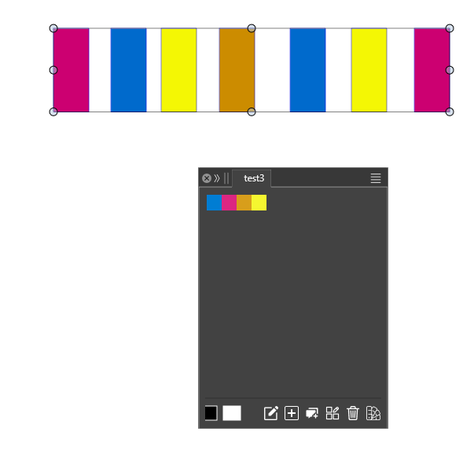
Here a pic with the selected Objects and the color palette result
after choose "Create Palette from selected Objects"
Alternative Ideas for gradient creation.
Vectorstyler offers a lot of Gradient options. But creating multi stop
Gradients is not really fun. That's why I've collect some ideas to make
creating multi-level gradients a little easier and fun for users.
I dont know if those Ideas are really good or well thought but we have
have to start from somewhere.
.
.
First Idea:
Create a gradient from a bunch of selected Objects, colored of course.
Select all Objects and choose create Gradient from selected Objects.
Gradient Stops can be set evenly, in the direction of objects are created,
as a user can arrange them later on.
.
.
Second Idea:
However, for this Idea a obstacle would first need to be removed.
Vectorstyler currently does not copy colors that appear multiple times
into a color palette. When creating a color palette from selected objects,
colors that appear multiple times are only added once.
See this Thread here:
https://www.vectorstyler.com/forum/topic/5688/multiple-occurrences-of-the-same-color-are-not-included-when-creating-a-color-palette.
Oddly enough, duplicating colors in a color palette is possible,
as is copying the same color to another palette via drag and drop.
Using the colors from a Color Palette and read them from left to right
of a color palette was my second idea. The Stops can be set evenly
for creation as the user can arrange them later
But this make only sense if the obstacle above is solved.
.
.
Third Idea:
Create a gradient form a multi blend.
Multiblends between Objects are already possible in Vectorstyler.
The start and end Objects could be used as repective gradient stops
again Stops can be set evenly and user can arrange them later.
.
.
Fourth Idea:
Create a the colors for Gradient from a bitmap.
Creating a color palette from a bitmap is already possible.
I think it would be nice to have this for Gradients too.
The user should be able to choose how many Gradient Stops he like
to have and VectorStyler should create the Gradient accordently
from a Bitmap.
I still couldn't figure out how to generate the halftone using selected objects converted to symbols. I could select only one of the symbols there (the popup menu is too dark to see what symbols are there with a dark theme and if some tick option is present). When I selected all three symbols outside the menu, VS crashed.
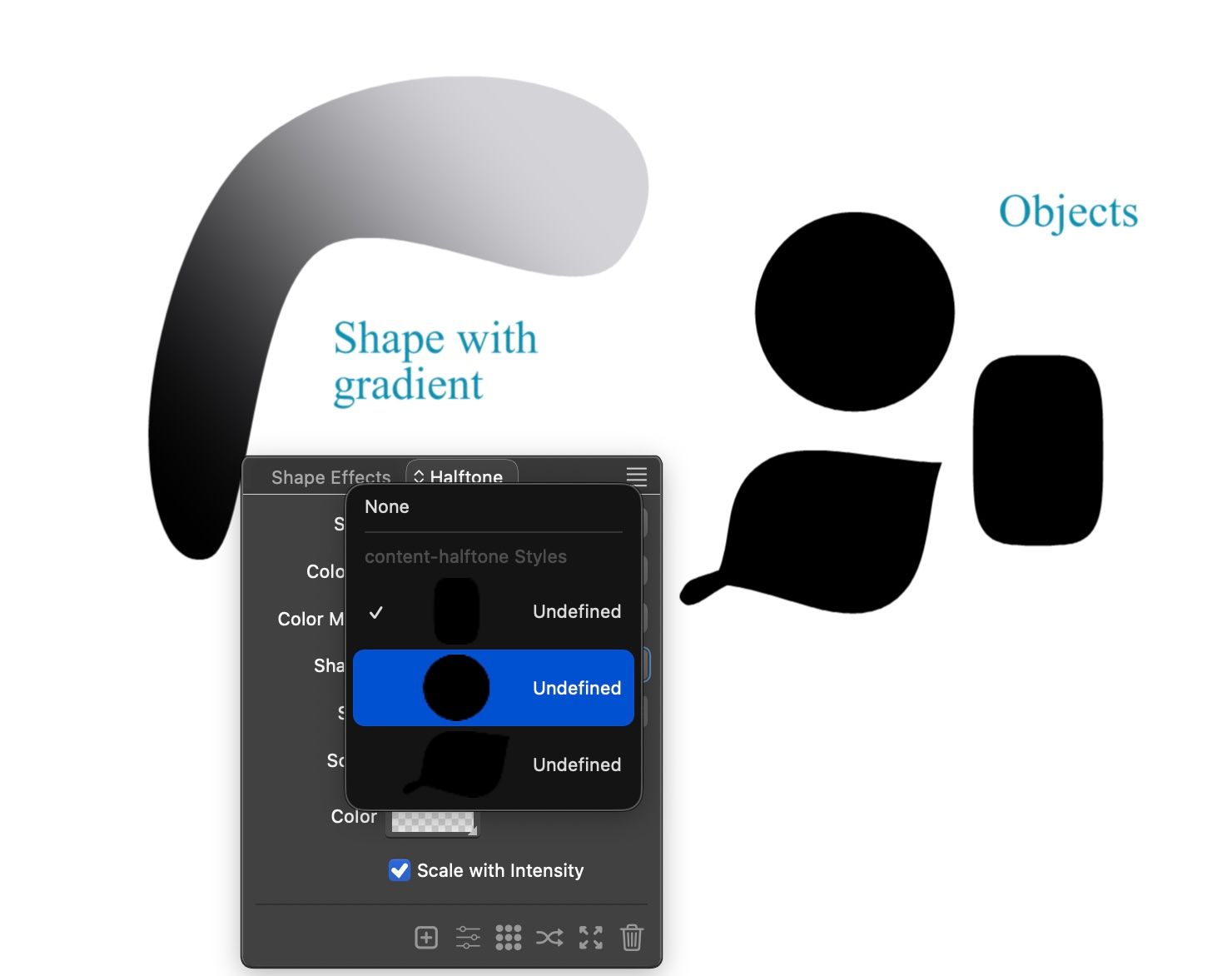
Attaching the file here.
content-halftone.vstyler
Could use search function for online documentation. I know it's possible for PDF.
The video Issue about ScreenPal is now resolved
All my videos created with ScreenPal will remain available for the time being.
I took the ScreenPal Solo Deluxe subscription for €48 per year as a temporary measure.
This gives me more time to consider alternatives, and all the videos made
with ScreenPal will remain available during this time.
If you are interested in the reason, look here.
https://www.vectorstyler.com/forum/topic/5671/screenpal-is-reducing-free-video-hosting-to-10-videos-only

Using Node Remover does not update the changes. It is necessary to refresh the view . At first I thought it didn't work at all, but after using it a few times and using a knife, changes suddenly appeared.

VectorStyler 1.3.011 release notes
- Added paragraph option for text shaping
- Improved halftone handling inside distorted groups
- Added a backdrop color option for halftones
- Allow expanding halftones inside groups
- Pick colors with Option(Alt) modifier while in the Gradient tool
- Fixed a bug in context menu while text is selected
- Changed the position of brush options in the context panel
- Allow repeater and halftone expanding inside groups
- Expanding objects should convert to curves first
- Keep visible backdrop when expanding repeater
- Allow Option(Alt)+ select inside mirror and transform groups
- Select imported graphics
- Fixed a bug in AI file opening with linked images
- Fixed a bug in importing mask images with colors from AI files
- Fixed a bug opening AI files with gradients
- Fixed a bug in repeaters with visible backdrop
- Fixed a bug in Layers panel to select objects
- Fixed a bug in perspective drop shadow
- Fixed a bug in corner editing
- Fixed a bug in creating image effect styles
- Fixed a bug in Shape and Image Effects panel updating
- Fixed a bug in Clip to Artboards display mode
- Fixed a bug in in Drop Caps handling
- Fixed a regression in the node removal tool
- Fixed a bug in exporting PNG files
- Fixed a bug in scaling mirror and transform groups
I am still wondering how to use the interpolated tool. When I double-click it, it opens a panel where the mode is set to Catmull-Rom. No matter what other options are there, it falls back to Catmull-Rom mode.
Contour shapes generated are not uniform. At sharp edges the outer shapes are not following original curve and specified distance.
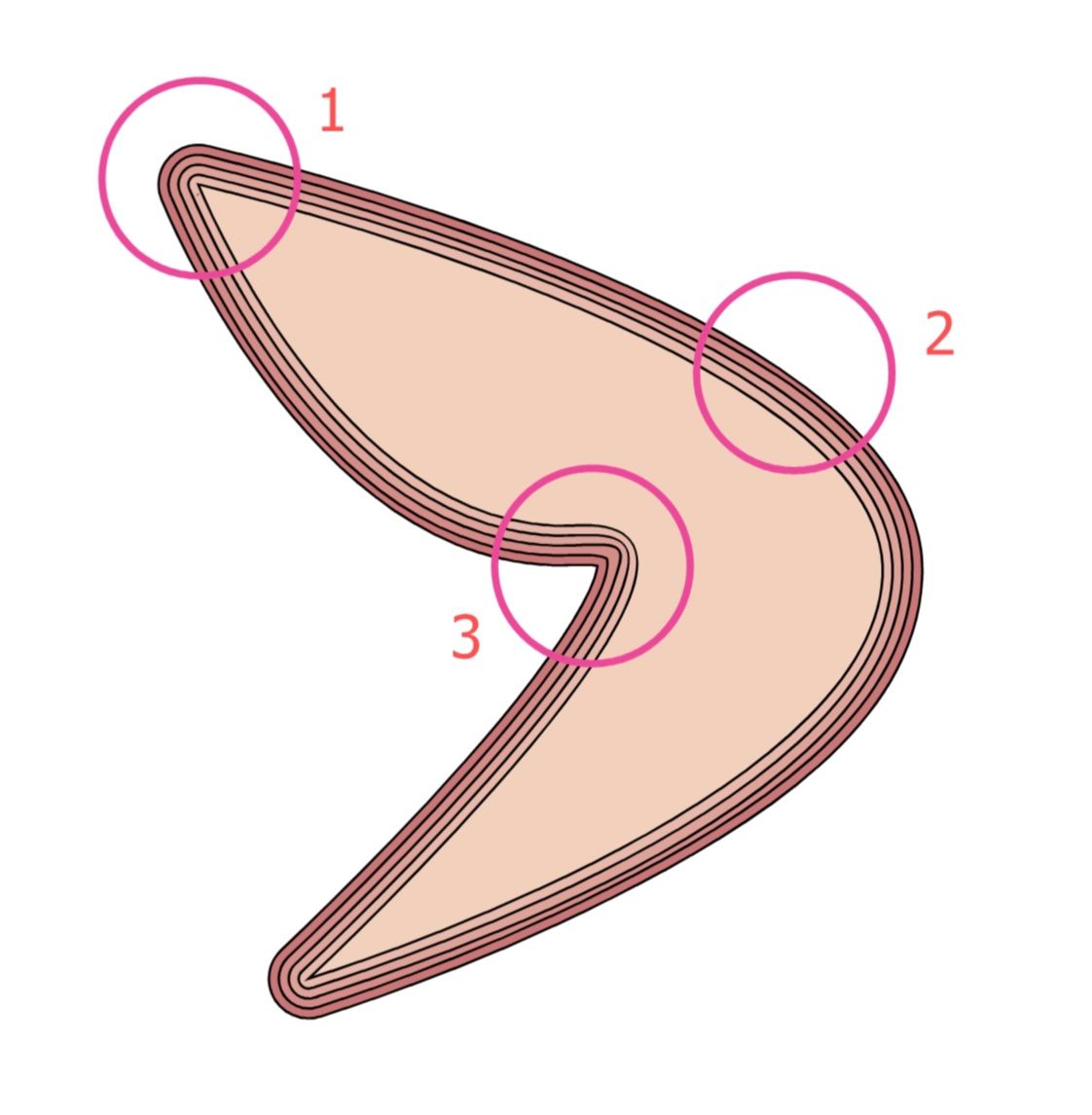
Attaching the file.